
Admins can target program steps based on participants’ match status, allowing more relevant and personalized content delivery.
This feature helps admins:
- Deliver more relevant step content
- Improve participant engagement
- Reduce irrelevant or outdated information
- Personalize the mentoring journey based on real-time match status
What this feature does
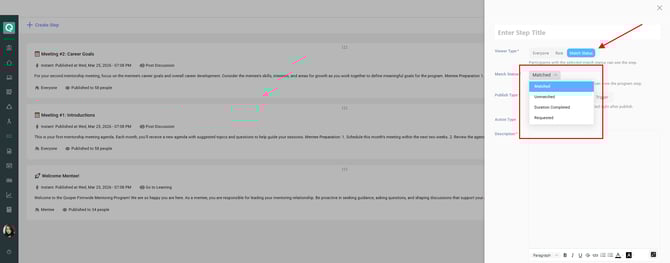
The Viewer Type option in program steps now includes Match Status, which allows admins to control visibility based on a participant’s current mentoring match state.
When selected, admins can choose one of the following statuses:
- Matched
- Unmatched
- Match Requested
- Duration Completed
Participants will only see steps that match their current status.
Where to find it
- Go to your Admin account
- Open Program Steps
- Create or edit a step
- Find the Viewer Type options.
- Select Match Status

- Choose the specific status condition
How it works
- The step will only be visible to participants whose match status matches the selected condition
- If a participant does not match the condition, the step will not be shown to them
Important limitation
- Match Status Viewer Type is only available for:
- Instant steps
- Scheduled steps
It is not supported for trigger-based steps
Best practices
- Use Matched to deliver onboarding or engagement content for active matches
- Use Match Requested to guide users waiting for acceptance
- Use Unmatched to encourage participants to find a mentor or mentee
- Use Duration Completed for wrap-up content or next-step guidance
Learn More
- Create a Program Step — full step setup guide
- Trigger Types for Publishing Steps — control when steps are published
- Action Types in Program Steps — define what users are guided to do