
The Mentor Capacity feature helps program administrators identify which mentors have room for additional mentees and which have reached their connection limits.
When enabled, Qooper displays each mentor's active mentee count, connection limit, and remaining availability directly in the participant list. Admins can also use the Capacity filter to narrow the list to mentors who have available spots or are already at capacity.
🔍 Viewing Mentor Capacity
Open the program's Matching section and locate the Mentees column in the participant list.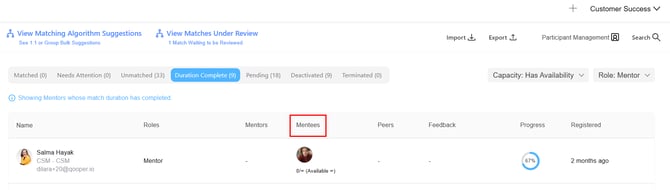
When Mentor Capacity is enabled, each mentor's capacity information appears in this column:
- Limited Capacity: Displays the number of active mentees, the mentor's connection limit, and remaining spots Example:
1/4 (Available 3)means the mentor has 1 active mentee out of a maximum of 4, leaving 3 available spots. - Unlimited Capacity: Displays an infinity symbol when no connection limit is set. Example:
2/∞ (Available ∞)means the mentor has 2 active mentees and no maximum connection limit.
🎛️ Filtering Participants by Capacity
Admins can use the Capacity filter to find mentors based on their availability.
- Open the program's Matching section.
- Set the Role filter to All or Mentor.

- Open the Capacity filter.

- Select one of the following options:
| Filter Option | Description |
|---|---|
| All | Displays participants regardless of mentor capacity. |
| Has Availability | Displays mentors who have room for additional mentees. |
| At Capacity | Displays mentors who have reached their connection limit. |
💡 Tip: Select Has Availability before matching a new group of mentees to quickly identify mentors who can accept additional connections.
📌 How Mentor Capacity Is Calculated
A mentor's capacity is based on their active matches, not their pending connection requests.
The following rules determine which connections count toward capacity:
- Active Matches: Count when the participant is the mentor and the paired mentee is still active.
- Pending Match Requests: Do not occupy a capacity spot or cause a mentor to appear as At Capacity.
- Inactive or Ineligible Mentees: Matches with mentees who are deleted, deactivated, or marked Not Eligible do not count toward the mentor's capacity.
- Unlimited Capacity: Mentors without a connection limit are displayed with the infinity symbol.
⚠️ Important Notes
- The Capacity filter works alongside the Role filter across participant list tabs, including Matched and Duration Complete.
- Selecting Mentee in the Role filter hides the Capacity filter because capacity applies only to mentors.
- Mentee rows do not display capacity information.
- Capacity details in the Mentees column and the Capacity filter are hidden when the Mentor Capacity feature is disabled for the organization.
- The Needs Attention and Match Requests tabs do not load the same active-match list as other tabs, so capacity counts follow the active matches available in those views.