
The Prior Activity Visibility toggle gives program admins more flexibility when publishing triggered steps in Qooper.
This setting allows you to decide whether a triggered step should be shown only to participants who complete an activity after the step is created, or also to users who have already completed that activity in the past.
It’s designed to make sure every eligible participant receives important content, improving engagement and helping maintain a consistent program experience.
How It Works
When you create or edit a triggered step, you’ll see an option called Prior Activity Visibility.
- When turned ON:
Participants who already completed the trigger activity will also receive the step.
For example, if a mentee already scheduled their first meeting before you created this step, they’ll still receive it once the feature is on. - When turned OFF:
The step will only be shown to participants who complete the trigger activity after the step is created.
For example, if the step is linked to “First Match,” only users who are matched after the step is published will receive it.
This helps you control whether a step should apply retroactively (to past actions) or only going forward (to new actions).
Where to Find the Setting
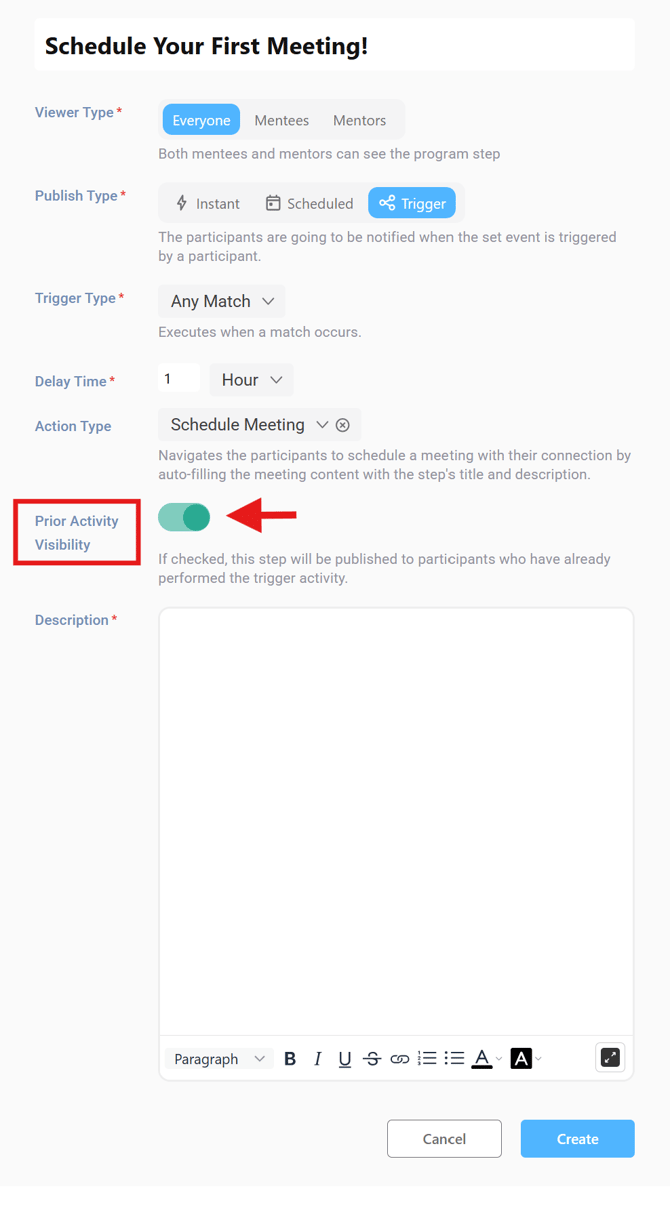
You can find the Prior Activity Visibility toggle when creating or editing a step in the Admin Dashboard.
It appears only when the Publish Type is set to Triggered.
By default, the toggle is turned ON, and the tooltip explains:
“If checked, this step will be published to participants who have already performed the trigger activity.”
Supported Step Types
This setting is available only for Triggered steps.
It does not appear for steps published as Instant or Scheduled.
How Qooper Handles Step Delivery
Qooper automatically handles timing and delivery based on user activity:
- If a user completed the trigger activity in the past and the delay time has already passed, the step appears right away.
- If there’s still remaining delay time, the step will be shown once that time passes.
- For most trigger types, only active and ongoing matches are considered.
- For triggers such as “Goal Not Set” or “Meeting Not Scheduled,” Qooper checks if the user currently have any active matches missing those actions.
Notifications
Participants will receive notifications for published steps according to their existing preferences.
This ensures consistency, no additional setup or changes to your notification settings are needed.
Admin Dashboard Experience
To make management easier, you can now view the Prior Activity Visibility status directly from:
- The step listing view, and

- The step detail view.
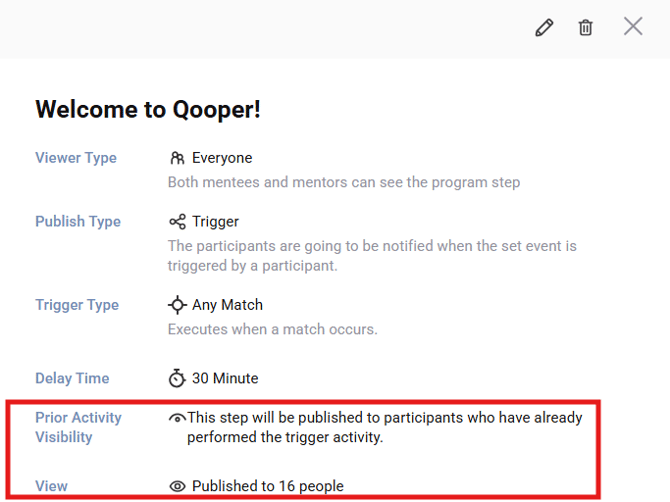
This means you can quickly verify the setting without opening the editor for each step.
Best Practices
- Keep Prior Activity Visibility ON if you want users who have already completed an activity to also receive the related step.
- Keep it OFF for steps that should only apply to future actions.
- If you’re introducing new steps mid-program, turning it ON ensures no participant misses the step.
- Always test triggered steps with a few users before applying them to your entire program.
Summary
- Available only for Triggered steps
- ON (default): Applies to users who completed the trigger activity in the past or will do so in the future
- OFF: Applies only to users who complete the trigger activity after the step is created
- Helps maintain consistent engagement for both existing and new users