
The Program page in Qooper has been redesigned to make program settings easier to find and manage. Instead of scrolling through one long list, admins can now access program details and grouped settings under Configuration, while connected tools are managed separately under Integrations.
🎥 Watch the video guide below to see the new layout and how the settings are organized.
What’s New?
The Program page is now organized into two tabs:
- Configuration: Contains program details, wording changes, tags, badges, and grouped program settings.
- Integrations: Contains the existing integration setup for connected tools.
Settings under Configuration are organized into clearly labeled sections, each with a name, description, and status.
How It Works
- Open your program in the admin dashboard.
- Select Configuration to access program details and settings, or Integrations to manage connected tools.
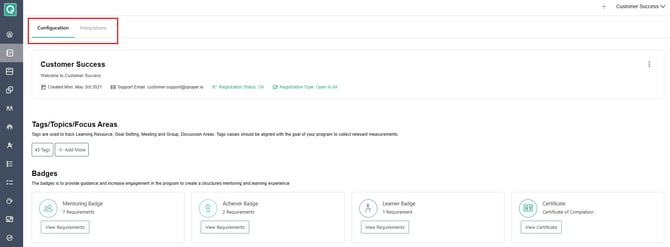
- Under Configuration, find the relevant section and update the setting as needed.
- Switch settings on or off as before, following any existing confirmation steps.
Available Configuration Sections
Settings are grouped into the following areas:
- Participant Onboarding
- Matching
- Match Approval
- Match Inactivity
- Match Conclusion
- Mentoring
- Mentoring Agreement
- Groups
- Learning
- Surveys
- Manager Reporting
- AI
✨ Benefits
- Easier navigation: Find related settings without searching through one long list.
- Better organization: Settings are grouped by function for quicker access.
- Familiar controls: Existing on/off switches and confirmation steps continue to work as before.
- Clearer separation: Program configuration and integrations are accessible from separate tabs.
📌 Important Notes
- This update changes the page layout, not the behavior of existing settings.
- There is no separate Settings tab on the updated Program page.
- Previously bookmarked links that pointed to a separate settings tab now open Configuration.
- Notification setup is not included in this layout change.
- Any existing bookmarked links to the old settings tab will automatically redirect to the new configration tab.