
The Under Review feature helps admins validate algorithm-generated match suggestions before they become active matches. It is designed for programs where match quality needs to be reviewed collaboratively before participants are notified.
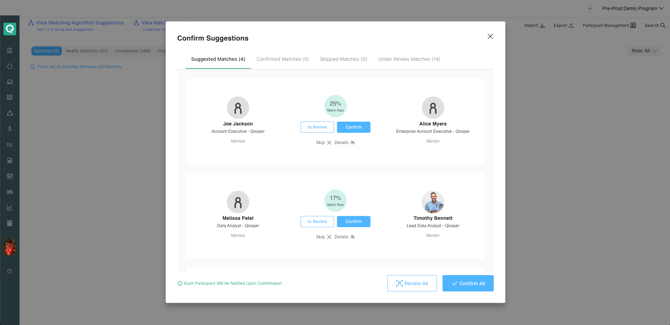
1. Move Match Suggestions to Under Review
Admins can flag one or multiple algorithm-generated match suggestions as “Under Review” before confirming them.
- What it does: Moves selected match suggestions into an Under Review state, separate from confirmed matches
- Why it matters: Allows team sign-off before matches go live
- How to use:
- Use the To Review button on individual cards
- Or Review All for bulk action
- Suggestions then appear under the Under Review Matches tab
2. View and Manage Matches Under Review
A dedicated Under Review Matches tab is available in the bulk suggestions interface.
-3.png?width=670&height=325&name=image%20(2)-3.png)
- What it does: Displays all suggestions with statuses of Under Review, Approved, or Declined
- Why it matters: Centralizes all review activity in one place
- How to use: Available actions per card include:
Approve
Marks the match suggestion as approved and ready to be confirmed as a live match.
Decline
Marks the match suggestion as declined. Declined pairings may not appear again in future matching runs, as participants can instead be suggested to different matches.
Remove
Removes the match suggestion from the Under Review queue without declining it permanently. This allows the same pairing to appear again in future matching runs if it is still considered a strong match by the algorithm.
Undo
Reverts the previous review action (Approve, Decline, or Remove) and returns the suggestion to the Under Review state.
View Details
Opens a side-by-side comparison view of participant profiles to help admins evaluate match compatibility before making a decision.
-3.png?width=670&height=326&name=image%20(1)-3.png)
- Access: Also available from the Matching screen and User Details page
3. Confirm Approved Match Suggestions
Once review is complete, admins can finalize approved matches in bulk.
- What it does: Converts approved suggestions into live matches and dismisses declined ones
- Why it matters: Reduces the need for individual match confirmation
- How to use: Click Confirm Approved from the Under Review tab
- Note: A confirmation dialog shows how many matches will be created and dismissed
- Limitation: This action is final — confirmed matches are immediately live
4. Download Matches Under Review
Admins can export match review data as an XLSX file.
- What it does: Exports all under-review match suggestions
- Why it matters: Enables sharing with stakeholders who do not have admin access
- Includes: Participant names, roles, positions, organizations, match rate, and review status (Approved / Declined / Under Review / Not Eligible)
Important Note:
Match suggestions that are already in the Under Review queue will not appear again when running Bulk Suggest, including suggestions that have been marked as Declined. If you want to clear declined suggestions from the Under Review queue, click Confirm Approved, which will confirm approved matches and remove declined suggestions from the list.