
Conditional Matching allows admins to define required matching conditions based on profile form responses. These conditions act as eligibility rules, ensuring that participants only match when specific criteria are met.
Conditional Matching rules are configured within the Matching Algorithm Rules section of your program settings.
Before You Begin
-
Conditional Matching applies only to single-choice and multiple-selection profile questions.
-
These rules check defined conditions before calculating match compatibility.
-
Overly restrictive conditions may reduce available matches.
Step 1: Navigate to Matching Algorithm Rules
-
Go to Program Settings.
-
Select Matching Algorithm Rules.
-
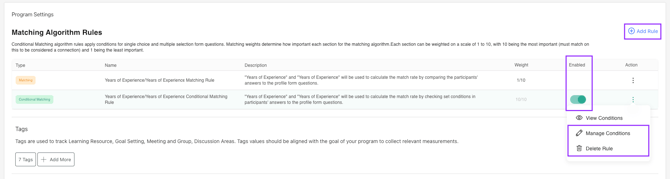
Click Add Rule in the top-right corner.
Step 2: Select Conditional Matching
When adding a new rule:
-
Choose Conditional Matching as the rule type.
-
Select the profile question you want to apply conditions to.
-
Save the rule.
The rule will now appear in the Matching Algorithm Rules list.
-2.png?width=670&height=323&name=image%20(1)-2.png)
Step 3: Manage Conditions
After creating the rule:
-
Click the three-dot menu under the Action column.
-
Select Manage Conditions.
This opens the condition builder.
Step 4: Configure Conditions
Inside the Manage Conditions window, you can:
-
Define conditions for mentors and mentees separately
-
Choose response values that must match
-
Add multiple response selections
-
Use AND / OR logic between rule groups
Each condition block determines how participant responses must align in order to be considered eligible for matching.
Click Save once your configuration is complete.
Understanding AND vs OR
- OR: At least one rule must be true for the match to be suggested.
- AND: All conditions within a rule must be true for the match to be suggested.
Enabling or Disabling the Rule
In the Matching Algorithm Rules table:
-
Use the toggle under the Enabled column to activate or deactivate the Conditional Matching rule.
Disabling the rule preserves your configuration without deleting it.

Deleting a Rule
To permanently remove a Conditional Matching rule:
-
Open the three-dot menu.
-
Select Delete Rule.
Deleted rules cannot be restored.

How Conditional Matching Works with the Matching Algorithm
Conditional Matching is evaluated before compatibility scoring.
If participants do not meet the defined conditions, they will not be considered a match — even if their algorithm compatibility score is high.
These rules apply whether the algorithm is enabled or disabled in self-matching programs.
Best Practices
-
Start with one condition before layering multiple groups
-
Use OR logic carefully to avoid unintended match expansion
-
Monitor match availability after enabling a rule
-
Test in smaller cohorts before scaling