
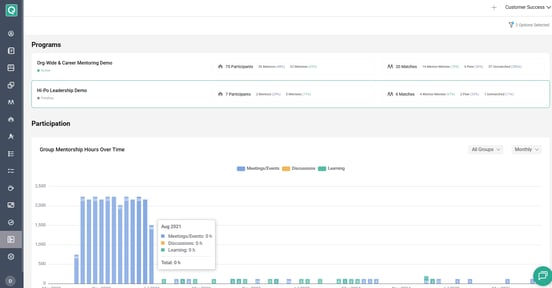
The Enterprise Dashboard gives admins who manage multiple programs a centralized view of their programs in one place. Instead of switching between individual program workspaces, admins can use the Enterprise Dashboard to view program information and quickly navigate to the programs they manage.
🔑 Key Capabilities
- Unified Program View: View information across multiple programs from one dashboard.
- Easy Navigation: Quickly access individual program workspaces without manually navigating through each program.
- Multi-Program Management: Manage and monitor programs from a centralized admin experience.
🧭 How to Access the Enterprise Dashboard
The Enterprise Dashboard is available to admins with the appropriate multi-program permissions.
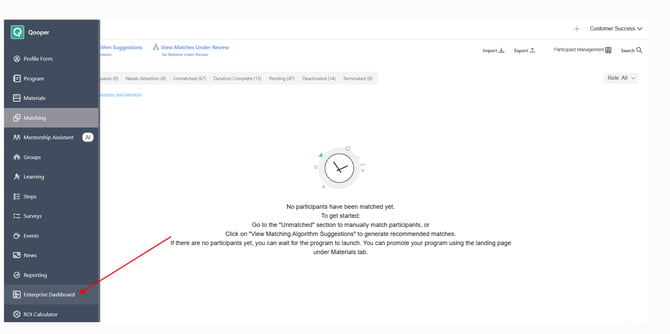
- Sign in to your Qooper account.
- Open the main navigation menu.
- Select Enterprise Dashboard.
🔎 Filter and Access Your Programs
Once you open the Enterprise Dashboard:
- Use the Program filter to find and view the programs you want to manage.
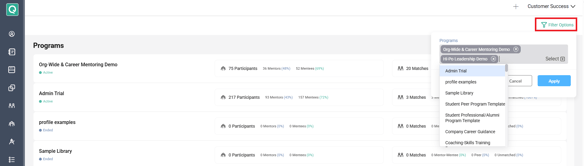
- Select a program from the list to access its individual admin workspace.
- Use the program workspace to manage that specific program.
⚙️ Need Access to the Enterprise Dashboard?
If you manage multiple programs but don't see the Enterprise Dashboard option, reach out to your Qooper Customer Success Manager (CSM) to confirm whether the feature can be enabled for your organization.
📌 More Information
For a visual walkthrough, watch the Enterprise Dashboard video.