
If participants were imported into the program and all required profile form responses were included during the import, administrators have two options for activating pending accounts:
- Automatic activation: Enable the Activate Pending option in Program Settings. Pending participants will be activated automatically within 24 hours.
- Manual activation: Activate participants individually by following the steps below.
Both methods allow participants with completed required profile information to be activated without creating their accounts first.
How to Activate a Pending Participant
- Navigate to the Admin Dashboard. and click on Matching tab
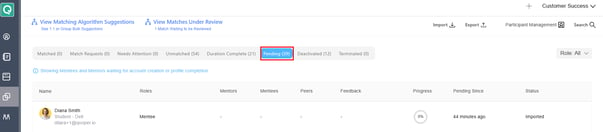
- Go to the Pending tab.
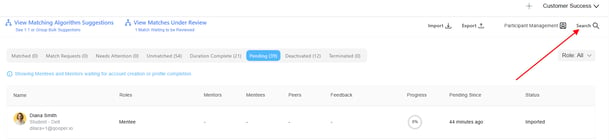
- Or search for the participant you would like to activate.
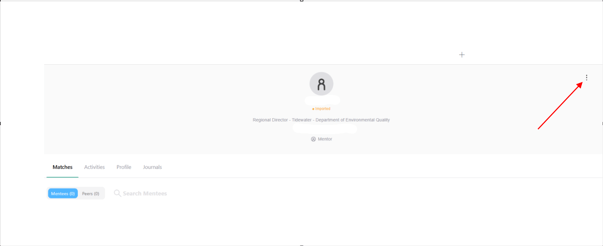
- Click the three-dot menu next to the participant's name.
- Select Manage Participant.
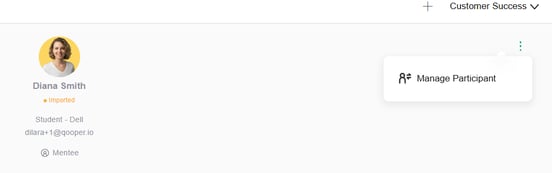
- In the Manage Participant window, select Activate Participant in Current Program.
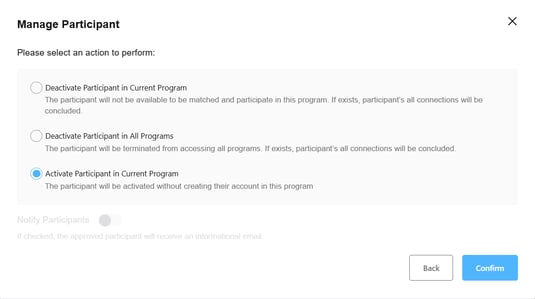
- Confirm the action.
The participant will be activated in the current program without creating their account.
Important Notes
- This process is commonly used for imported participants whose required profile information has already been provided.
- Ensure all required profile form questions have been completed before activating participants.
- Participants can be activated individually through the Manage Participant menu.
- Activating a participant does not modify their profile information.